
Case Studies / Anonymized Project Summary
Anonymized project summary: ERP portal and order synchronization
A public-safe project summary for synchronizing portal orders, inventory, pricing, customer references, and ERP order status.
The business problem
A customer-facing portal or catalog system creates value only when it stays aligned with ERP. Customers need accurate product data, stock levels, pricing, and order status. Internal teams need the portal to respect ERP ownership instead of creating duplicate order work or conflicting references.
The operating risk is duplication. A portal order can be accepted externally, but the ERP team still has to know whether it should create a new order, match an existing one, update an external reference, or reject the record for review.
How we solved it
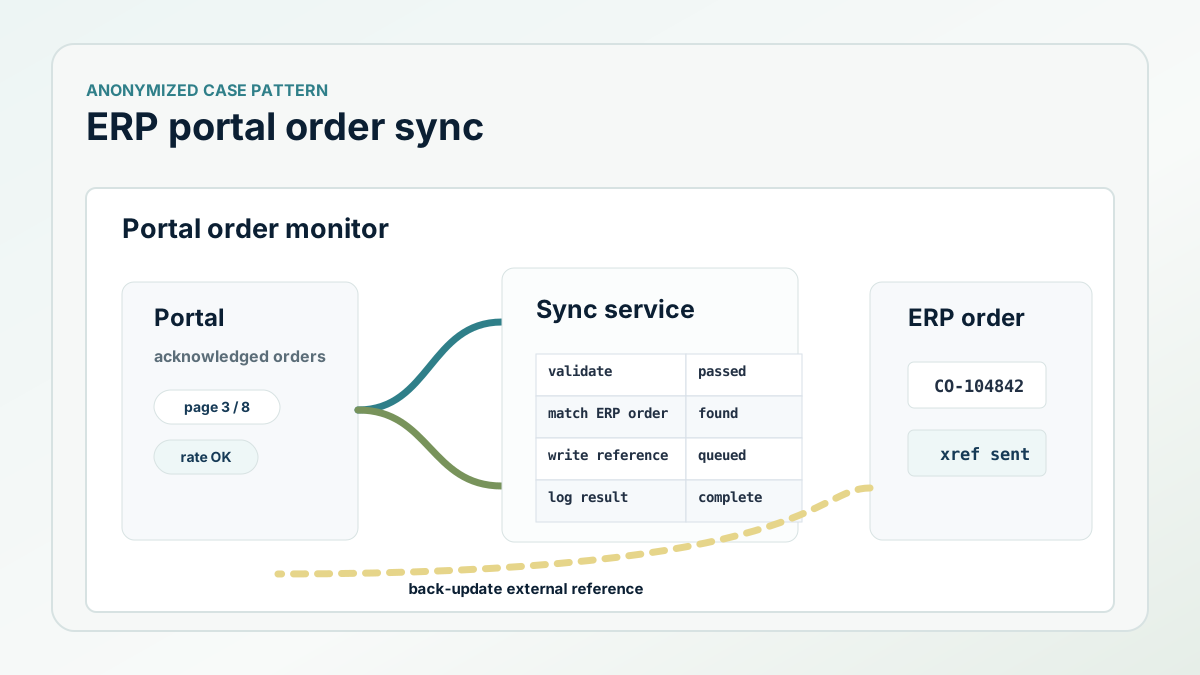
The integration split the portal work into inbound and outbound flows. Outbound jobs sent ERP inventory, price, discount, cost, and catalog-related updates to the external system in controlled batches. Inbound order jobs pulled acknowledged portal orders, filtered them to the approved customer scope, and validated whether an ERP order already existed.
If a valid ERP order already existed, the integration could update the external reference so the portal and ERP were speaking about the same order. If the order did not exist, the integration prepared the ERP-side creation path and then back-updated the external system with the ERP order number after creation.
What the implementation looked like
The order sync tracked the last runtime, converted the external system's time window into API parameters, paged through order results, handled temporary locks and rate limits, and skipped orders that were not in the right status. That prevented the integration from pulling too much data or acting on orders that were not ready.
The outbound jobs used change sets so only meaningful inventory, list price, cost, discount, and fixed-price changes were sent. Payloads were batched, serialized, written to a local watcher, and logged with counts. That made the integration observable: support could see how many records were processed, changed, skipped, or failed.
- Use last-runtime windows instead of full reprocessing.
- Only import portal orders that are in an approved status.
- Match existing ERP orders before creating new ones.
- Back-update the portal with the ERP order reference.
- Batch outbound inventory, pricing, discount, and cost updates.
The ROI to measure
The ROI is fewer duplicate order checks, less manual pricing and inventory reconciliation, faster customer service status lookup, and a clearer support trail when a portal record and ERP record disagree.
Next step
Need a cleaner ERP-to-portal integration path?
Start with ownership, validation, monitoring, and support notes before scaling the data flow.