
AI for ERP / How-To Guide
AI-assisted ERP support triage that still respects expert review
How to design an AI support intake workflow that gathers useful ERP context before an expert starts troubleshooting.
The business problem
A lot of ERP support time is spent before troubleshooting begins. A user says a report is wrong, a label did not print, an import failed, or an order looks stuck. The support team then has to ask for the report name, transaction number, screen, timing, expected result, actual result, and business impact.
That back-and-forth is expensive because it delays the expert. It also frustrates users, who may not know which details matter. AI can help here if it behaves like a structured intake assistant rather than a pretend ERP consultant.
How to solve it safely
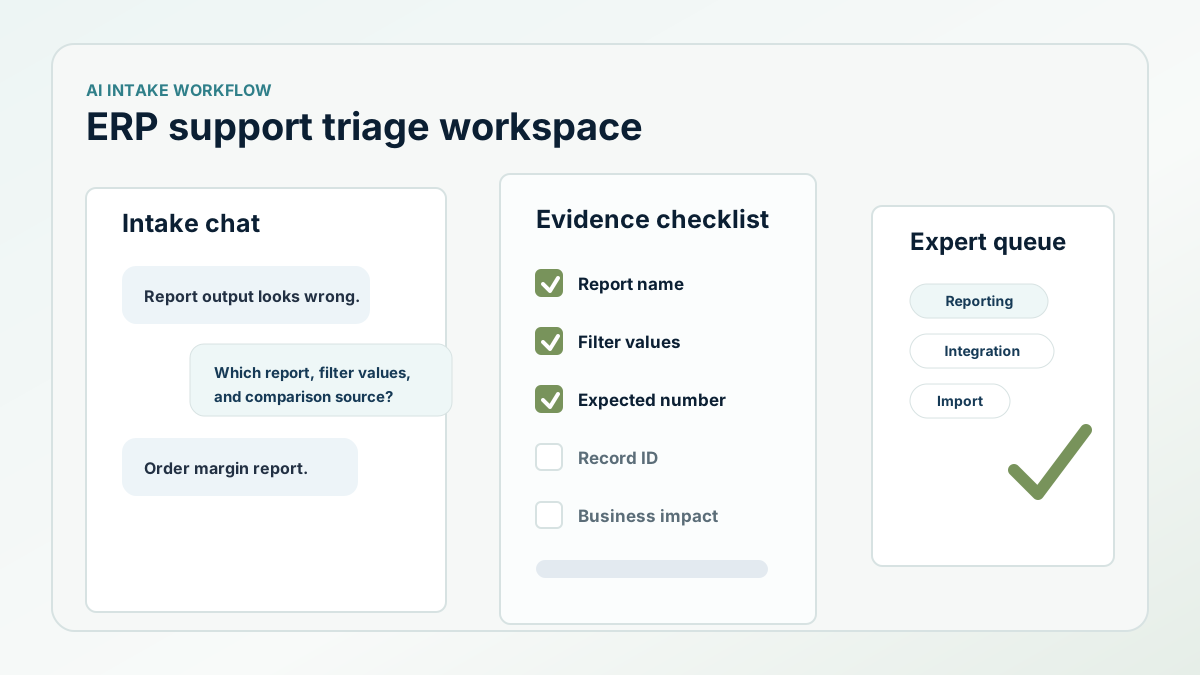
The triage assistant should ask workflow-specific questions and build a useful support brief. If the issue sounds like reporting, it should ask for the report, filter values, expected number, and comparison source. If it sounds like an import or export, it should ask for the file, run time, error message, and whether the source was changed. If it sounds like an integration, it should ask for the external system, last successful run, and affected record type.
The AI output should be a draft ticket summary with missing evidence called out. It should not promise the cause or make a system change. An expert still owns diagnosis and correction.
What the implementation should look like
The workflow starts in Slack or a web form. The user describes the issue. The assistant classifies the likely ERP area, asks a small number of follow-up questions, and creates a ticket summary that includes business impact, record context, likely workflow, attachments needed, and a suggested owner.
The system should learn from corrections. If the support lead changes the category from reporting to integration, or adds a required field the AI missed, that correction should update the intake checklist for similar future issues. Over time, the assistant gets better at asking the right first questions.
- Use separate intake templates for reports, imports, integrations, labels, posting, and data questions.
- Ask for record IDs and timing, but avoid exposing private data outside approved systems.
- Create an expert-ready ticket summary instead of an unsupported answer.
- Track category corrections and missing-context corrections as memory.
- Measure reduced clarification messages and faster first response.
The ROI to measure
The payoff is support leverage. You measure time from first report to actionable ticket, the number of clarification messages before diagnosis, how often issues route to the correct owner on the first pass, and whether repeated user questions decline.
Next step
Need support intake that respects ERP complexity?
Business Intuition can help define a human-reviewed AI triage workflow around your real support patterns.