
Project Notes / Connector Story
Medius SyteLine connector for AP automation
How a repeatable Medius connector pattern keeps SyteLine and CloudSuite Industrial AP data moving with validation, visibility, and support ownership.
The business problem
AP automation only creates value when the approved invoice can become a clean ERP transaction. A finance team may use Medius for invoice review, matching, approvals, expenses, and supplier onboarding, but SyteLine or CloudSuite Industrial still owns the records that determine whether the work can actually post.
The practical problem is the handoff. Supplier records, payment terms, chart of accounts, purchase orders, receipts, coding rules, invoice approvals, voucher response, payment status, expense records, and onboarding updates all have to stay aligned. If those flows are unclear, AP users end up checking two systems and ERP support has to reconstruct why an invoice failed.
Connector work like this is supported through our SyteLine AP Automation product.
Why it matters
A weak connector turns AP automation into a faster approval process followed by manual reconciliation. Finance still has to chase voucher numbers, explain posting errors, confirm whether a supplier is valid, and answer payment-status questions from the AP platform.
A stronger connector makes the AP workflow visible. Medius can handle invoice intake and approval while the ERP integration keeps source data, validation, posting response, and support evidence tied together.
How the connector worked
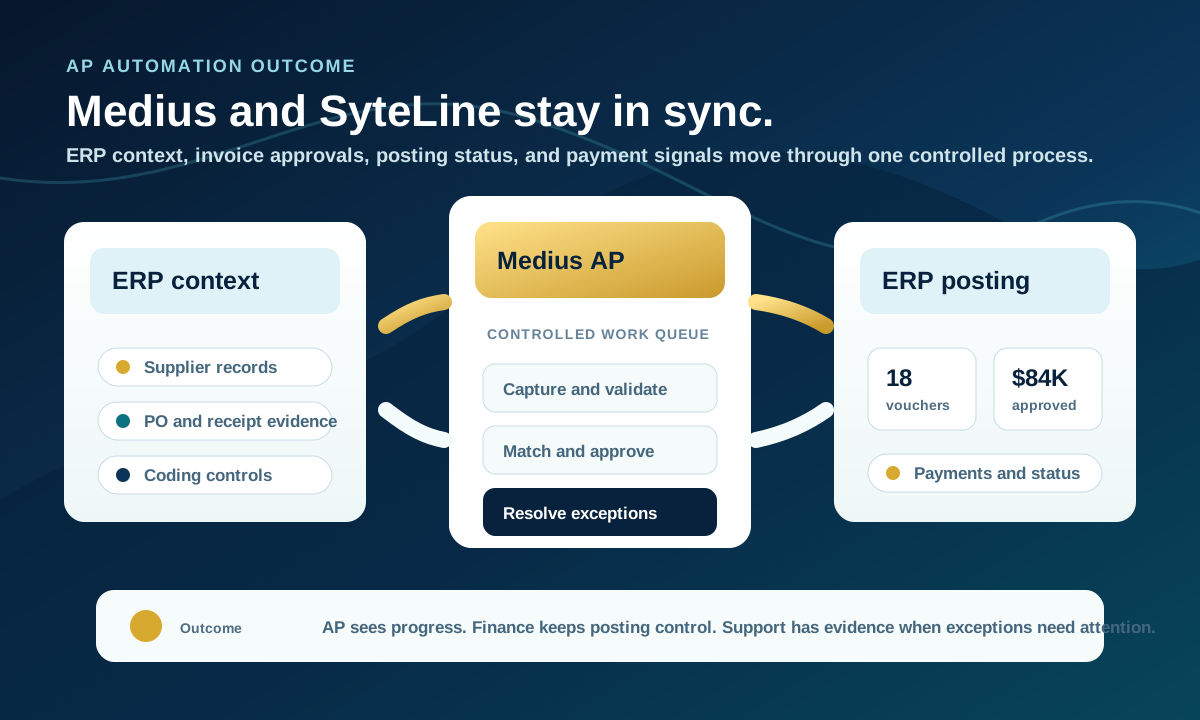
The implementation pattern started with outbound ERP context. SyteLine or CloudSuite Industrial supplies the AP platform with the master data and reference data needed for review, including suppliers, account structure, payment terms, coding restrictions, purchase order context, and receiving context.
Approved work then returns through controlled inbound paths. PO invoices and non-PO invoices are handled differently because they depend on different ERP evidence. After the ERP posting attempt, the connector returns readable response information so AP users can see voucher numbers, validation errors, blocked reasons, and status changes without a separate manual lookup.
The same operating model also supports payment updates, approved expenses, and supplier onboarding changes. The point is not just to move files. The connector needs to preserve ownership, timing, validation, and support visibility across the whole AP process.
- Send supplier, account, payment term, PO, and receiving context from ERP to the AP platform.
- Bring approved PO and non-PO invoices back through the correct ERP posting path.
- Return voucher numbers, posting errors, and status messages to the AP workflow.
- Include payment, expense, and supplier onboarding signals when those modules are in scope.
- Keep validation, retries, and support evidence visible enough for finance and ERP support to act.
Implementation approach
The first implementation decision is record ownership. Supplier data, account structure, payment terms, PO receipts, invoice approvals, vouchers, payments, expenses, and onboarding updates should each have a clear system of record and a clear timing expectation.
The second decision is exception design. A connector should not hide failed records. It should tell AP what needs attention: missing supplier data, invalid coding, a closed period, duplicate invoice risk, missing receipt context, blocked posting, or a payment-status mismatch.
The third decision is supportability. Finance and ERP support need enough log detail, queue visibility, retry behavior, and response history to resolve issues without rebuilding the transaction by hand.
The operational value
The outcome is a cleaner AP operating model. AP users spend less time rekeying and chasing status. ERP users retain posting control. Finance leaders get better visibility into invoices, vouchers, payments, expenses, and supplier onboarding without spreading the process across email and spreadsheets.
For SyteLine and CloudSuite Industrial teams evaluating Medius, the connector conversation should start with the business workflow: which AP records need to move, what validation protects posting, what feedback returns to the AP user, and how support will know what happened.
Next step
Need a Medius connector for SyteLine or CloudSuite Industrial?
Review the AP data flow first: master data, invoices, vouchers, payments, expenses, supplier onboarding, validation, and support ownership.